
💧 Add Watermark
Add text or logo watermark to multiple images
Drag & drop images here or click to select
JPG, JPEG, PNG (watermark will be added)Click to upload logo
PNG, JPG (with transparent bg)⚡ Other Image Tools
Add Watermark to Image Online — Free, No Signup
I added this tool to CombineJPG.com after getting the same question repeatedly from photographers and small business owners: how do I stop people from just downloading and reposting my photos without credit?
There are paid tools for this, but honestly the job is simple enough that it should not cost anything. Upload your image, place your text or logo, download. That is the whole process and it works on JPG, PNG, and WebP files without any software to install.
Why Watermarking Actually Matters
If you post original photos online product shots, portfolio work, event photography, travel pictures, anything you created there is a real chance someone will save and reuse them without asking. A visible watermark does not make theft impossible, but it does two things: it makes the effort not worth it for most people, and it means your name or brand travels with the image even when it gets reshared across platforms.
For photographers selling prints or licensing work, a watermark also serves as a practical record of ownership if a dispute ever comes up. For businesses, every reshared product photo with your logo on it is free advertising you did not have to pay for.
The good news is you do not need Photoshop or any desktop software to do this. An online watermark tool handles it in under a minute.
How to Add a Watermark to Your Photos
Step 1 — Upload your images
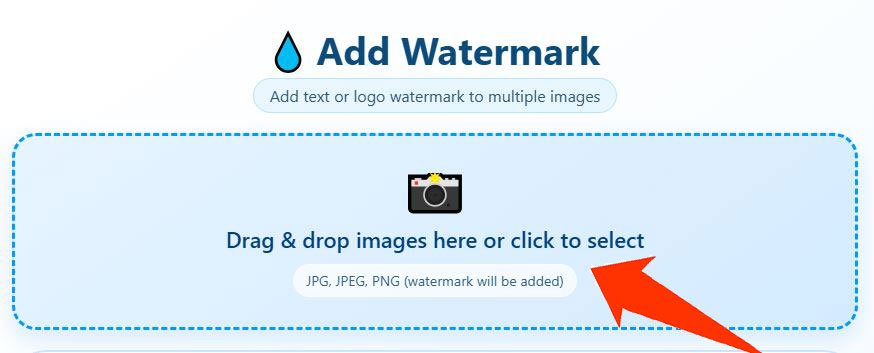
Click the upload area or drag your files in. You can add multiple images at once if you need to watermark photos in bulk — the same watermark settings apply to all of them, so a batch of 50 photos takes the same effort as doing one.
Step 2 — Set up your watermark
Choose between a text watermark or a logo watermark.
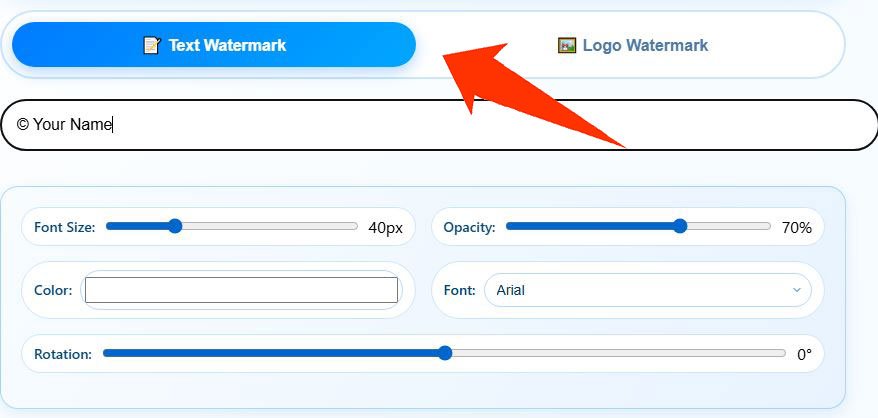
- For text, type what you want — your name, website URL, copyright symbol, or a custom phrase like “Do Not Repost.” Pick the font, color, size, and opacity.
- For a logo, upload a PNG file with a transparent background. This gives the cleanest result on any background color or photo type.
Both options let you drag the watermark to any position and adjust the transparency before applying.
Step 3 — Download your watermarked images

Once the preview looks right, hit download. If you uploaded multiple files, you can grab them all as a ZIP. The output quality matches your original — nothing is re-compressed or altered apart from the watermark layer being added on top.
What I Built Into This Tool
- Text and logo both supported: Some watermark tools online only handle one or the other. This one does both, so whether you want to add text to photo online or overlay your business logo, it works either way.
- Batch watermarking: If you have a full product catalogue or photo shoot to process, drop everything in at once. Same watermark, applied consistently across every image — no repeating settings file by file.
- No quality loss: The watermark is placed on top without re-encoding the photo underneath. The output file is the same quality as what you uploaded.
- Fully browser-based: Nothing is sent to a server. Your photos stay on your device the entire time. This matters when you are working with client photos, personal images, or anything sensitive.
- No account needed: Open the page, watermark your photos, download. No registration, no email address required, no subscription tier to worry about.
- Works on all formats: JPG, JPEG, PNG, and WebP files all work as input. The output downloads as a standard JPG or PNG depending on your original file.
Text Watermark vs Logo Watermark — Which One to Use
| Features | Text watermark | Logo watermark |
|---|---|---|
| Best for | Name, website URL, copyright line | Brand mark, business logo |
| Setup | Type and go | Needs a PNG file ready |
| Visibility | Subtle, easy to keep minimal | More prominent, instantly recognizable |
| Flexibility | Font, size, color, opacity | Size, position, opacity |
| Best result | Personal photographers, bloggers | Businesses, brands, agencies |
If you are just starting out and do not have a logo yet, a simple text watermark with your name or website URL works perfectly fine. If you have a brand logo, use that — it looks more professional and builds recognition every time the image gets shared.
Who Uses This Tool
Photographers: Whether you shoot weddings, portraits, or landscapes, watermarking your portfolio images before posting them online is standard practice. It does not have to slow your workflow down — batch upload and you are done in one go.
E-commerce sellers: Product photos get scraped and reused constantly. Adding your store name or logo to product images before listing them on Instagram, Facebook Marketplace, or your own site is a simple way to protect your catalogue.
Bloggers and content creators: If you create original graphics, infographics, or edited photos for your blog or social channels, a watermark ensures that when someone reposts your content, your site name comes with it.
Designers and agencies: Client work sometimes needs to be shared in draft form before final delivery. A semi-transparent watermark on proofs is a standard way to share work without releasing the final unprotected file.
Small business owners: From restaurant menus to real estate photos to handmade product shots — if the image represents your business, it should carry your branding.
Frequently Asked Questions
Can I watermark multiple photos at once?
Yes. Upload as many images as you need and the watermark settings apply to all of them together. Batch watermarking a full folder takes the same steps as doing a single image.
Will the watermark reduce image quality?
No. The photo underneath is not re-encoded or compressed during the process. The watermark sits on top as a layer, and the output file matches the quality of what you uploaded.
Do I need a PNG logo file to use the logo watermark option?
Technically any image file works, but PNG with a transparent background gives the cleanest result. A JPG logo will have a visible white or colored rectangle behind it on your photo, which looks unprofessional on most backgrounds.
Are my photos stored or uploaded anywhere?
No. The entire process runs inside your browser. Your images are never sent to any server, which means they stay completely private regardless of what you are watermarking.
What opacity level should I use?
It depends on what you need. For something subtle that proves ownership without distracting from the photo, 25 to 40 percent works well. If you want it clearly visible to discourage reuse, 60 to 70 percent is more effective. I usually start at 40 and adjust after checking the preview.
Can I add a copyright symbol to my watermark?
Yes. In the text watermark field, just type © followed by your name or year — for example, © 2025 YourName. Most keyboards support this with Alt+0169 on Windows or Option+G on Mac.
What is the best position for a watermark?
Away from corners, which are easy to crop. Placing it across a central area of the image, or over a detailed part where removal would be noticeable, makes it harder to strip cleanly.
Tips That Actually Make a Difference
Skip the corners. A watermark in the bottom right corner takes about three seconds to crop out. Place it across the middle or over an area with detail — faces, textures, products — where cutting it out would damage the image.
Match the watermark tone to the photo. A white watermark on a light sky disappears. A dark mark on a dark background does the same. Use the color and opacity controls to make sure it shows up clearly on the specific photo you are watermarking.
Use a transparent PNG for your logo. If your logo file has a white background, it will show as a white box on your photo. Export your logo from your design tool as PNG with transparency — or ask whoever made it to send you that version.
Keep your originals. Always save the unwatermarked versions separately. Watermarked copies are for sharing and publishing. You will want the clean originals for printing, editing, client delivery, or licensing.
Consistency builds recognition. Using the same watermark position, size, and opacity across your photos makes your work instantly recognizable in feeds and search results. Pick a style and stick with it.