
⚡ WebP to JPG Converter
Convert WebP images to high-quality JPG • Fast & Free
Drag & drop WebP images or click to select
Only WebP files accepted⚡ Pro Image & PDF Tools (Free & Instant)
Convert WebP to JPG Free Online — High Quality, No Signup
WebP images are everywhere online product photos, news images, Canva exports, screenshots. They open fine in a browser, but the moment you try to print, edit, or share one, problems start. Most photo editors, print shops, email clients, and older devices still do not support WebP natively.
This free online converter turns any WebP file into a high-quality JPG in seconds no account needed, no watermark, nothing uploaded to any server. Everything runs in your browser, on your device.
What Is WebP and Why You Need to Convert It
WebP is a modern image format developed by Google. Websites use it because file sizes are smaller than JPG, which makes pages load faster. That is great for performance online but the moment you try to use that image anywhere else, problems start.
Download a product photo from an e-commerce site: WebP. Save an image from a news article: WebP. Export from Canva or a web-based design tool: sometimes WebP. The format is everywhere online, but compatibility outside the browser is still inconsistent.
JPG has been around since 1992 and works on every device, every operating system, every photo editor, and every print service. That compatibility gap is exactly why a WebP to JPG converter is still needed every day.
When You Need to Convert WebP to JPG
- Printing photos: Almost every print shop and photo kiosk accepts JPG. WebP is rarely on the supported list. Convert your image before ordering a print.
- Editing in Photoshop, Lightroom, or GIMP: Older versions of these tools do not open WebP at all. Even newer versions handle it inconsistently. Converting to JPG first removes the headache entirely.
- Sending via email or messaging apps: Some email clients and older Android devices display WebP as a broken attachment. JPG delivers correctly on every platform.
- Uploading to online platforms: eBay, Amazon seller tools, WordPress, and many older CMS platforms reject WebP uploads. JPG is accepted without question.
- Viewing on Windows 10, Windows 11, and older devices: Windows does not open WebP files natively in Photos or File Explorer by default. JPG opens instantly in any image viewer on any operating system.
- Saving images from Canva: Canva sometimes exports in WebP format. If you need to use that image in a document, email, or print project, convert it to JPG first.
How to Convert WebP to JPG on This Page
I kept it to three steps because anything more is unnecessary.
Step 1 — Upload your WebP file
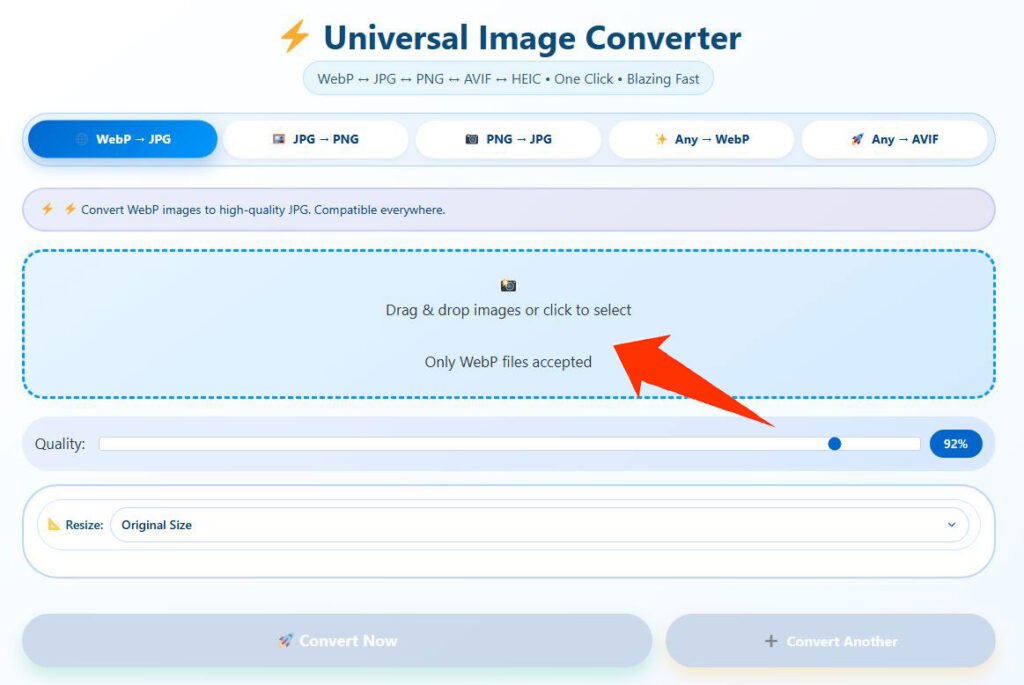
Click the upload area or drag your file onto it. You can drop multiple WebP files at once for batch conversion. The tool accepts any standard .webp file downloaded images, screenshots, Canva exports, anything.
Step 2 — Conversion happens in your browser
There is no upload to a server and no processing queue. Your file converts instantly inside your browser on your own device. No one else sees your images.
Step 3: Download Your JPGs

Click download. If you converted multiple files, download them individually or as a single ZIP. The output is a standard high-quality JPG that opens in any software.
Batch and Bulk WebP to JPG Conversion
Need to convert multiple WebP files at once? Drop an entire folder onto the upload area. The tool processes all files in parallel batch converting 50 files takes the same amount of time as converting one. Download everything as a ZIP when done.
This makes it the fastest way to bulk convert WebP to JPG without installing software or paying for a subscription.
Why This Converter Produces High Quality Output
Many WebP converters online do a poor job of the actual conversion they strip color data, reduce quality, or simply rename the file extension without re-encoding it properly. Here is what makes the output from this tool different:
High quality re-encoding: The converter properly re-encodes the image rather than doing a lazy format swap. Colors come out matching the original.
No visible quality loss: The output quality is set at a level that balances sharpness and file size. The difference from the original is not visible to the eye.
EXIF metadata preserved: If your WebP file had metadata — date taken, camera model, GPS location — the output JPG keeps it intact where the format allows.
No file size limits: Most online converters cap free conversions at 10–25MB. This tool handles large files without limits because everything runs locally on your device.
Completely private: Your images never leave your device. There is no server upload, no storage, no processing in the cloud. This is faster than any server-based tool and fully private.
WebP vs JPG — Quick Comparison
| Features | WebP | JPG |
|---|---|---|
| Where it works | Modern browsers, newer apps | Everywhere |
| File size | Smaller | Slightly larger |
| Transparency | Yes | No (becomes white background) |
| Print support | Rarely accepted | Universal |
| Photo editor support | Inconsistent | Universal |
| Privacy on conversion | Depends on tool | Depends on tool |
WebP wins on file size and web performance. JPG wins on compatibility. Once an image leaves the browser, JPG is almost always the safer choice.
How to Convert WebP to JPG on Windows 10 and Windows 11
Windows does not natively open or convert WebP files in File Explorer. The simplest way without installing software is to use this browser-based converter open the page in Chrome or Edge, upload your WebP file, and download the JPG in seconds. No software installation required.
If you have multiple files, drop the entire folder into the upload area and download a ZIP with all converted JPGs.
How to Convert WebP to JPG on iPhone and Android
The tool runs fully in mobile browsers Safari on iPhone and Chrome on Android. Open the page, tap the upload area, select your WebP image from your photo library or Files app, and download the JPG. No app download needed.
Frequently Asked Questions (FAQ)
Does converting WebP to JPG reduce quality?
There is always a small amount of re-encoding when changing formats. At the quality level this tool uses, the difference is not visible to the eye. If your original WebP was sharp, the JPG output will be sharp too.
Can I batch convert multiple WebP files to JPG at once?
Yes. Drop as many WebP files as you need onto the upload area and they all convert together. Download them as individual files or as a single ZIP archive.
Does this work on iPhone and Android?
Yes. The tool runs in Safari on iPhone and Chrome on Android without requiring an app.
Is there a file size limit?
No fixed limit. The tool handles most standard image files comfortably. Very large files — above 30–40MB — may take a few extra seconds depending on your device, since all processing happens locally.
Does WebP with transparency convert correctly?
JPG does not support transparent pixels. If your WebP has a transparent background, the converter fills it with white. If you need to keep transparency, use a WebP to PNG converter instead.
Does this tool upload my images to a server?
Your images are 100% private. All processing happens locally in your browser using JavaScript. No images are uploaded to any server. Your files never leave your device, ensuring complete privacy and security.
How is this different from CloudConvert or Convertio?
Those tools upload your files to their servers for processing. This converter runs locally in your browser — which is faster, completely private, and free with no file limits. You do not need to create an account on either service.
Can I convert WebP files downloaded from Canva?
Yes. Canva sometimes exports images as WebP. Upload the file here and download a JPG that works everywhere.
What is the difference between JPG and JPEG?
Nothing — they are identical formats. JPG and JPEG are the same file format; the only difference is the file extension length, a leftover from older operating systems that had a 3-character extension limit.
How does the quality compare to Canva or other converters?
Our converter uses the same high-quality JPEG encoding as professional tools like Canva and Photoshop. The adjustable quality slider (70-100%) lets you control the balance between file size and image quality. At 92% quality (default), you get excellent visual quality with significantly smaller file sizes.
A Few Tips Before You Convert
Start with the largest version of the image you can find. If a website has a thumbnail and a full-size WebP, download the full-size one. Converting a compressed WebP will not add back quality that was already lost.
WebP with transparency becomes a white-background JPG. JPG does not support transparent pixels. If you need to keep transparency, convert to PNG instead.
Batch converting a folder? Drop everything in at once rather than file by file. The tool processes files in parallel and is significantly faster that way.