
Merge ID Card Front and Back – Combine Both Sides
Merge front & back of ID card into one JPG or PDF file
Click or drag Front image
JPG, PNG, JPEGClick or drag Back image
JPG, PNG, JPEG🔍 Preview: Merged ID Card
Merge ID Card Front and Back Online Free – Combine Both Sides into One Image
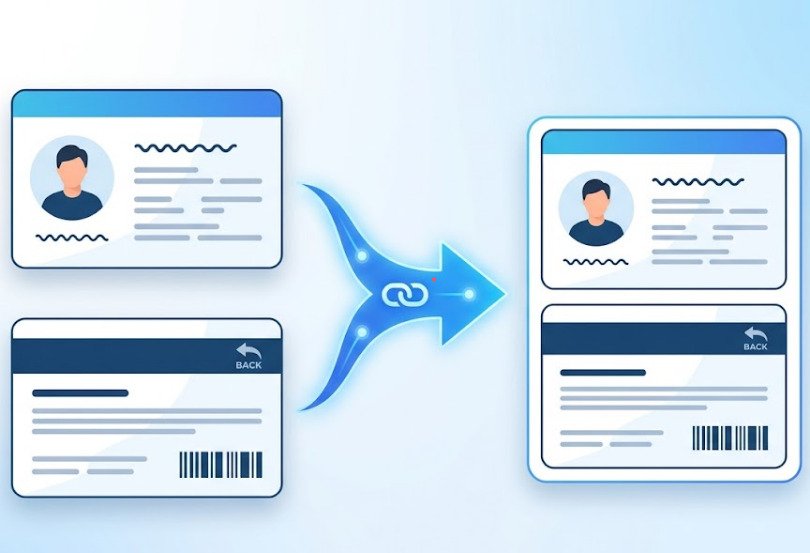
If you are one of them who got a bank form asking for both sides of your ID card in a single file? Or a visa application that needs your driving license front and back on one page? Then you are in the right place. This free browser-based online tool which combine any two-sided identity document into one clean image or PDF free no app, no account, no server upload, and no watermark. Just upload, merge, and download in few clicks.
How to Merge ID Card Front and Back in 3 Simple Steps
Most people finish this in under 30 seconds.
Step 1 – Upload the Front Side
Click the front upload box and select your image. JPG, JPEG, and PNG files all work. A preview appears immediately so you can confirm it loaded correctly.
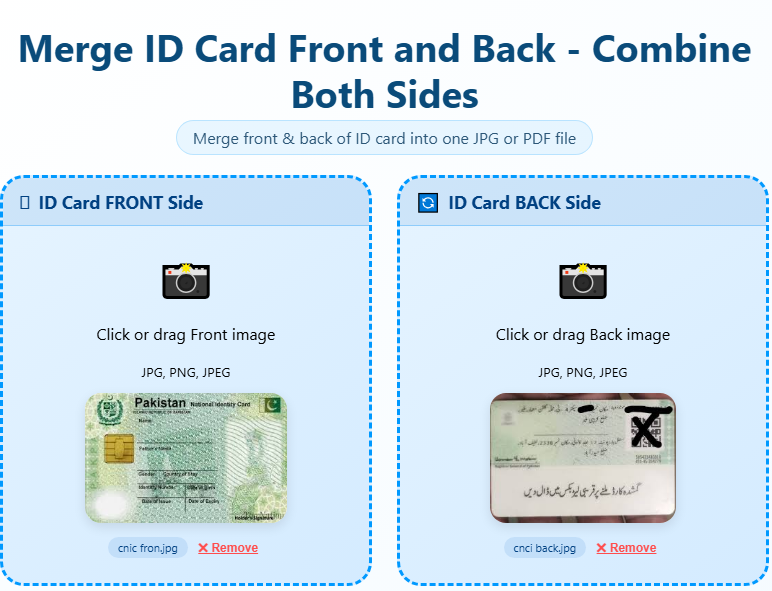
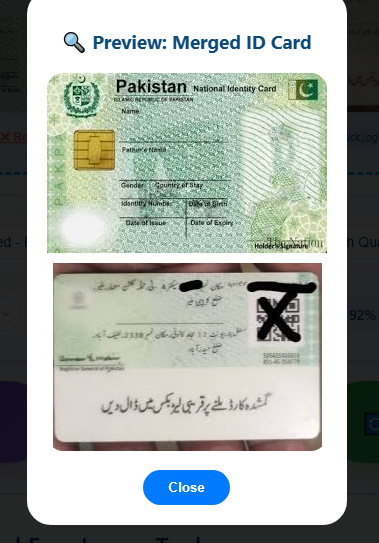
Step 2 – Upload the Back Side
Click the back upload box and add the second image. Both sides will display as previews, giving you a chance to check alignment and orientation before proceeding.
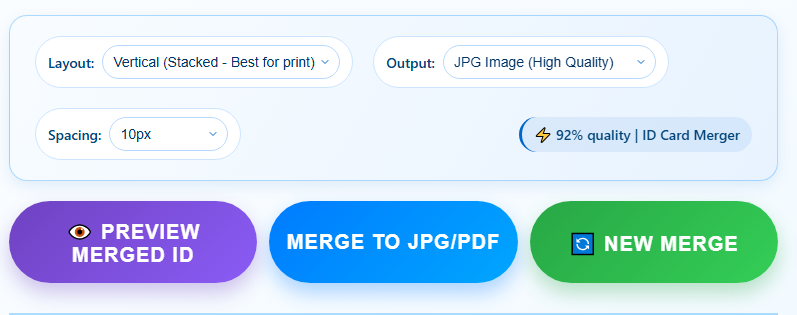
Step 3 – Choose Layout and Download Pick horizontal (side by side) or vertical (top and bottom), then click Merge ID Card. Your combined file is ready instantly. Download it as a high-quality JPG or as a print-ready A4 PDF — whichever format the receiving party requires.
Supported ID Cards – Aadhaar, PAN, CNIC, Driving License, Voter ID
This tool is design works with every type of identity document, from every country. Here are the most common ones people combine every day:
Aadhaar Card
Merge Aadhaar card front and back online for KYC verification, bank account opening, and SIM card registration. Both regular and masked Aadhaar versions are fully supported.
PAN Card
Combine PAN card front and back into one image for income tax filings, demat account registration, and financial document submissions across Indian banks and institutions.
CNIC / NIC
Merge CNIC front and back online free for Pakistani bank KYC, passport renewal, mobile SIM registration, and job applications. Works for all Pakistani national identity documents.
Driving License
Combine driving licence front and back for car rental bookings, insurance claims, and traffic authority verification in any country.
Voter ID Card
Merge voter ID card front and back for election commission forms, government scheme applications, and address proof submissions.
Employee ID Card
HR departments and payroll teams can combine employee ID card front and back for digital records and access management systems.
Student ID Card
Educational institutions use this to merge student ID card front and back for examination hall tickets, library cards, and attendance systems.
Passport Photo Page
When a visa application or embassy form asks for both the photo page and address page together, this tool handles it cleanly.
Any Two-Sided Identity Document
The tool accepts any front and back image pair, regardless of country, card size, or issuing authority.
Merge ID Card Side by Side (Horizontal) or Top-Bottom (Vertical)
The layout you choose depends on how and where the merged file will be used. Here are two formats you can use for merging online documents.
Horizontal layout (side by side)
Places the front on the left and the back on the right within a single wide image. This works best for digital viewing on desktop screens, wide-format uploads, and situations where both sides need to be visible at a glance without scrolling. Banks and online portals that display documents in landscape mode typically accept this format.
Vertical layout (top and bottom)
Stacks the front above the back in a portrait-orientation image. This suits printing on A4 or Letter paper, official document submissions, and mobile phone viewing. Government portals and embassy forms that specify “both sides on one page” almost always expect this format.
You can switch between both layouts before downloading to preview the result and pick whichever fits your submission requirement.
Download as JPG or PDF – Print Ready A4 Format
JPG format is the right choice when you are sharing the merged image over WhatsApp, email, or any platform that accepts standard image files. The output maintains high quality at 95% compression text stays sharp and photos remain clear. File size is small enough for quick sharing without storage concerns.
PDF format is the better option for formal submissions. Most banks, government portals, embassies, and visa processing systems expect PDF documents rather than image files. The A4 PDF output from this tool is print-ready and looks professional. PDF files are also harder to alter after creation, which adds credibility to submitted documents.
Merge once, then download in whichever format the form or office requires. Both options are available on every merge.
Why Use This Tool to Combine Your ID Card Images
Completely free with no hidden charges
By using this tool you don’t need credit card, no subscription, and no usage limits. The tool is free to use as many times as needed.
No upload to Any Server — maximum privacy
Your ID card contains your photograph, full name, date of birth, home address, and a unique identification number. Protecting that information matters. This tool runs entirely inside your browser using your own device’s processing power. Your images are never transmitted to any server, never stored anywhere, and never visible to anyone else. Closing the browser tab clears everything from memory.
No Watermark on the Output
Many free tools stamp a logo or branding across the merged image, making it unusable for official purposes. This tool produces a completely clean output with no watermark of any kind.
Works on Every Device
Android phones, iPhones, iPads, Windows laptops, and Mac computers all work without any app download. Open the tool in Chrome, Safari, Firefox, or any modern browser and start merging.
No Registration Required
No account to create, no email to provide, no verification steps. The tool is ready to use the moment the page loads.
High Quality Output
Images are merged at their original resolution with no unnecessary scaling or compression. Your ID card text and photographs remain sharp and readable.
Instant Processing
There is no queue and no waiting time. The merge completes in under a second because all processing happens locally on your device.
100% Private – Your ID Images Never Leave Your Device
Identity documents are among the most sensitive files a person handles. Your Aadhaar number, PAN number, CNIC number, or any national ID number combined with your photo and address creates a complete personal profile that must be protected.
This tool is built as a browser-based application for exactly this reason. No images are uploaded to any server. No data is stored in any database. No logs are created or maintained. No third party ever receives your files. Your device does all the work, and when you close the tab, every trace of the images is removed from memory.
This is not just a privacy feature it is the architecture of the tool. There is no server component that could receive your data even if it wanted to. For sensitive KYC documents, this is the safest way to combine ID card images online.
Who Needs to Combine ID Card Front and Back
Millions of people search for this every day because the requirement appears across almost every major document submission process:
Bank account opening and KYC verification require both sides of a national ID card in a single digital file. Most banks will not accept two separate image attachments.
Visa and passport applications at embassies and consulates ask for both sides of your driving licence or national ID as part of the documentation package.
Government job application portals including Sarkari Naukri platforms across India, Pakistan, and Bangladesh specifically require ID card front and back merged into one image or PDF. Submitting two files or missing this requirement can result in instant rejection.
University and college admissions offices need verified identity documents for student records. A merged ID card reduces the number of files and simplifies document management on both sides.
SIM card registration and mobile KYC processes require both sides of a national ID to be visible on a single document for regulatory compliance.
Insurance claim submissions for health, vehicle, and life policies often need identity proof with both sides of an ID card clearly visible.
Property registration, scholarship applications, and online job portals have similar requirements. A single clean merged file covers all of them.
Frequently Asked Questions – ID Card Merge Tool
How do I merge ID card front and back online free?
Upload the front image and back image using the boxes above. Select your preferred layout horizontal for side by side, vertical for top and bottom. Click Merge ID Card and your combined image downloads instantly, completely free with no watermark.
Is it safe to merge my ID card online using this tool?
Yes. The tool is 100% browser-based, which means your ID card photos are never uploaded to any server. All image processing happens locally on your device. This makes it safe for Aadhaar, PAN, CNIC, driving license, and every other sensitive identity document.
Can I download the merged ID card as a PDF?
Yes. After merging, you can download your combined image as a high-quality JPG or as a print-ready A4 PDF. The PDF format is accepted by most banks, embassies, and government portals.
Does this work for Aadhaar card front and back merge online?
Absolutely. Upload both Aadhaar card images, choose your layout, and download. The tool works for both the regular Aadhaar letter format and the PVC card version, including masked Aadhaar.
Can I merge CNIC front and back online free for Pakistani bank applications?
Yes. Upload your CNIC front and back images, select horizontal or vertical layout, and download the combined image. Works for all Pakistani national identity documents and NADRA-issued cards.
How do I combine ID card side by side in a single image?
Select the Horizontal layout option before clicking merge. This places the front on the left and the back on the right within one wide image, which is the standard format for digital KYC submissions.
What image formats are accepted?
JPG, JPEG, and PNG are all supported. These cover virtually all photos taken on smartphones and most scanned images from home printers and scanners.
Is there a file size limit for uploaded images?
There is no strict limit. For the smoothest experience, images under 5MB each work best. Standard smartphone photos fall well within this range.
Can I use this on my mobile phone?
Yes. The tool is fully responsive and works on Android and iPhone browsers without any app download required.
Will my merged ID card image have a watermark?
No. The output is completely clean. No branding, logo, or watermark of any kind appears on your downloaded file.
Does this tool work for KYC verification submissions?
Yes. The output meets standard KYC requirements for banks, financial institutions, and online verification platforms. PDF format is recommended for formal KYC submissions.
What if I need to merge more than two images?
This tool is purpose-built for combining a front and back side of one identity document. For merging three or more images together, the main image merger tool on this site handles that.
Pro Tips for a Better Merged ID Card
Take photos in good natural light near a window and avoid using flash, which creates glare on laminated card surfaces. Place your card flat on a plain background any curve or bend distorts the text.
- Crop out excess background before uploading using the crop tool on this site. This makes the merged result look cleaner and more professional.
- Try to photograph both sides from the same distance and angle so the two images appear consistent when merged.
- Always check both previews before clicking merge. Confirm the images are correctly oriented and all text is readable.
- Choose PDF over JPG for any official submission it is more widely accepted and looks more professional in formal contexts.