How to Resize & Compress Your Resume Photo to the Perfect Size (Free 2026 Guide)

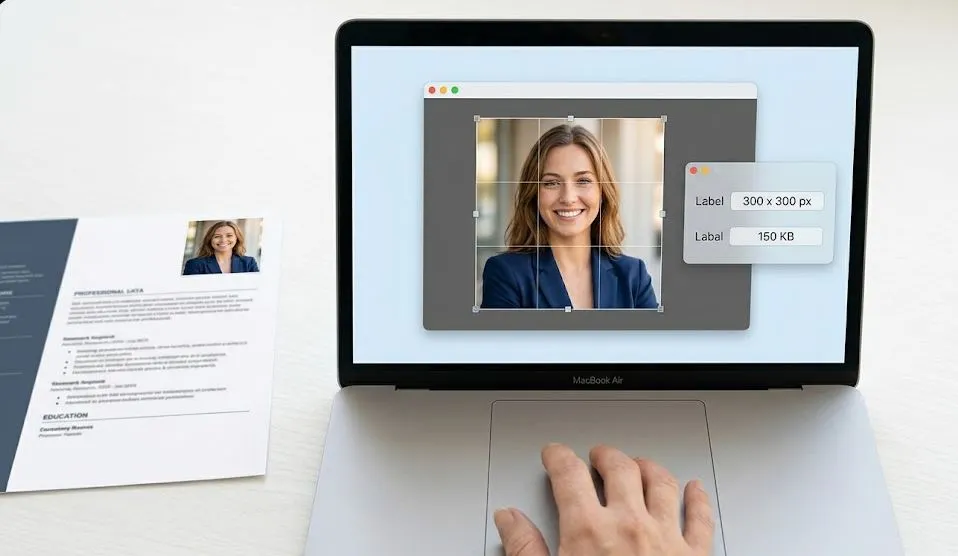
A resume with the wrong photo size looks unprofessional before the recruiter reads a single word.
You spent hours perfecting your resume layout. You chose the right font, the perfect bullet points, and tailored your experience section. Then, you added a photo. But when the hiring manager opens your file, the image is either:
- So large it crashes their email preview
- So stretched you look like a funhouse mirror reflection
- Or so compressed that you look like a pixelated ghost
In 2026, first impressions happen in milliseconds. If your resume photo is warped, blurry, or oversized, the recruiter may never get to your actual qualifications. They will simply move to the next candidate.
The good news? Fixing this takes less than 60 seconds. In this guide, we will cover the exact resume photo size requirements by country, how to resize photo for resume perfectly, and how to compress photo for job application without losing quality — all using a free online tool.
Do You Need a Photo on Your Resume?
This is the first question every job seeker asks. The answer depends entirely on where you are applying.
USA & Canada: Usually No
In the United States and Canada, including a photo on your resume is generally not recommended and sometimes even prohibited. Why?
- Anti-discrimination laws: Employers want to avoid any appearance of bias regarding age, race, gender, or appearance.
- Applicant Tracking Systems (ATS): Photos can confuse automated resume scanners, causing your file to be rejected before a human sees it.
Recommendation: Omit the photo entirely unless specifically requested (e.g., for acting, modeling, or some customer-facing executive roles).
UK, Europe, UAE, Asia: Often Yes
In the United Kingdom, Europe (especially Germany and France), the UAE, Singapore, and much of Asia, a professional headshot is standard and expected.
- Germany: Almost mandatory for many corporate and administrative roles.
- UAE & Singapore: Highly valued for client-facing positions; shows professionalism and attention to detail.
- UK: Becoming less common but still preferred in finance, law, and hospitality.
Recommendation: Check the job posting and company culture. When in doubt, a small, professional photo at the top-right corner is safe.
Resume Photo Size Requirements by Country/Region (2026 Guide)
If you decide to include a photo, you absolutely must get the dimensions right. Here are the current professional standards.
| Country / Region | Photo Required? | Recommended Size (Pixels) | File Format | Max File Size |
|---|---|---|---|---|
| USA / Canada | No (avoid if possible) | N/A | N/A | N/A |
| United Kingdom | Optional / Preferred | 200 x 200 to 400 x 400 | JPG or PNG | Under 500 KB |
| Germany | Yes (common) | 300 x 300 to 500 x 500 | JPG | Under 500 KB |
| UAE / Saudi Arabia | Yes (for many roles) | 300 x 300 (square) | JPG | Under 300 KB |
| Singapore / Malaysia | Yes (client-facing) | 250 x 250 to 400 x 400 | JPG | Under 500 KB |
| India | Sometimes (IT/BPO often no, hospitality yes) | 200 x 200 | JPG | Under 200 KB |
| France / Spain | Yes (common) | 300 x 300 | JPG or PNG | Under 500 KB |
Pro Tip: A square photo (1:1 aspect ratio) is the safest choice because it displays perfectly on LinkedIn, work portals, and most ATS systems.
How to Resize & Compress Your Resume Photo — Step by Step
Now that you know the required dimensions, let us actually fix your image. You do not need Photoshop or expensive software. You just need a free online image resizer that handles privacy and bulk processing.
Using CombineJPG Free Image Resizer (Recommended)
This is the fastest way to resize photo for resume without losing quality or downloading software.
Step 1: Go to the Tool
Open your browser and navigate to the free image resizer tool. It works on Windows, Mac, iPhone, and Android.
Step 2: Upload Your Photo
Click the upload area or drag and drop your photo file. The tool accepts JPG, PNG, and WebP formats.
Step 3: Enter Your Target Dimensions
Based on the table above, enter your required size. For example:
- For UAE: Width = 300, Height = 300
- For Germany: Width = 500, Height = 500
Important: Make sure the “Aspect Ratio Lock” is enabled. This prevents your face from looking stretched or squished.
Step 4: Set a Target File Size (Optional but Recommended)
Recruiters often receive hundreds of resumes via email. A 5MB photo will get your email bounced or deleted. To compress photo for job application:
- Select “Target File Size” mode
- Enter 200 (for 200KB) or 300 (for 300KB)
- The tool automatically compresses while preserving quality
Step 5: Resize and Download
Click the “Resize Image” button. Within 2–3 seconds, your perfectly optimized resume photo will download.
That is it. No signup, no watermark, and your privacy is guaranteed (files auto-delete within 60 minutes).
How to Compress Photo for Upwork & Fiverr Profile
If you are a freelancer on Upwork or Fiverr, your profile photo is arguably more important than your resume. Clients decide to hire you based on that tiny thumbnail.
Platform Requirements for Freelancers:
| Platform | Recommended Size | Max File Size | Format |
|---|---|---|---|
| Upwork | 200 x 200 (square) | 5 MB | JPG or PNG |
| Fiverr | 300 x 300 (square) | 5 MB | JPG or PNG |
| 400 x 400 | 8 MB | JPG or PNG |
How to Compress for Upwork/Fiverr:
Since freelancer profiles require very small file sizes for fast loading, use this method:
- Upload your professional headshot to the CombineJPG image resizer.
- Set the dimensions to 300 x 300 pixels (for Fiverr) or 200 x 200 (for Upwork).
- Enable “Target File Size” and enter 100KB. This ensures your photo loads instantly on any device.
- Download and upload to your profile.
A fast-loading, crisp profile picture signals that you are technically competent, which is essential for tech, design, and writing gigs.
Tips for a Professional Resume Photo (Look Like a Pro)
Size and compression are technical. But quality is visual. Follow these rules to ensure your headshot for CV helps, not hurts, your application.
Background
- Do: Use a plain, solid-color background (white, light gray, or soft blue).
- Do: Stand against a neutral wall or use a professional backdrop.
- Don’t: Use a busy office, your messy bedroom, or a vacation beach photo.
Clothing
- Do: Wear solid, neutral colors (navy, charcoal, white, cream).
- Do: Dress one level above the job you want (business casual is safe).
- Don’t: Wear busy patterns, logos, or overly trendy accessories.
Lighting
- Do: Use soft, natural light facing you (sit facing a window).
- Do: Ensure your face is evenly lit with no harsh shadows.
- Don’t: Use overhead ceiling lights or flash that creates “raccoon eyes.”
Expression & Pose
- Do: Smile genuinely with your eyes (think of a happy memory).
- Do: Look directly at the camera lens, not the screen.
- Do: Frame from the upper chest to just above the head.
- Don’t: Use selfies, group photos cropped down, or heavily filtered images.
Common Resume Photo Mistakes (Avoid These at All Costs)
Even with the right job application photo format, job seekers make these critical errors:
| Mistake | Why It Harms Your Application | The Fix |
|---|---|---|
| Using a cropped wedding/party photo | Looks unprofessional and distracting. | Take a new, dedicated headshot. |
| Heavy Instagram filters | Alters your appearance; feels deceptive. | Use only natural color correction. |
| Outdated photo (more than 2 years old) | Recruiter expects to recognize you at interview. | Update your photo annually. |
| Casual attire (t-shirts, hoodies) | Signals you do not take the role seriously. | Wear a collared shirt or blazer. |
| Photo too large (over 1MB) | Emails get rejected or flagged as spam. | Compress to under 300KB using target file size. |
| Wrong aspect ratio (rectangle instead of square) | Gets cut off or distorted in ATS systems. | Crop to 1:1 square before resizing. |
Frequently Asked Questions (FAQ)
What size should a resume photo be in KB?
For email attachments and online applications, aim for 200 KB to 500 KB. Use the “Target File Size” feature in the free image resizer to set exactly 200 KB or 300 KB.
Should my resume photo be JPG or PNG?
Use JPG for photographs (better compression, smaller file size). Use PNG only if you need a transparent background (rare for resumes). For most job seekers, a high-quality JPG at 80% quality is perfect.
How do I crop my photo to a square?
Use the free image resizer tool mentioned above. Upload your photo, set equal width and height (e.g., 400 x 400), and enable the aspect ratio lock. Then adjust the crop area to center your face.
Can I use a selfie on my resume?
No. A selfie taken at arm’s length creates unnatural perspective (enlarged nose, small ears). Either have someone take your photo from 5–6 feet away or use a tripod with a timer.
How to compress a photo for a job application without losing quality?
Use a tool that offers “lossless” or “smart” compression. The CombineJPG image resizer preserves details and colors while reducing file size by automatically removing invisible metadata.
What if the job portal says my photo is too large?
Go back to the image resizer, select “Target File Size,” and enter a smaller number (e.g., 100 KB or 150 KB). Re-download and try uploading again.
Do I need a photo for government job applications?
Most federal government jobs (USA, Canada, UK) explicitly forbid photos to prevent bias. Do not include one unless requested. For state or local government roles, check the specific application guidelines.
Conclusion
Your resume photo is often the very first visual element a recruiter notices. A pixelated, oversized, or stretched image screams “amateur” before they read a single achievement. Conversely, a properly sized, cleanly compressed, professional headshot signals that you pay attention to details.
You do not need expensive software or a professional photographer (though that helps). You just need the right dimensions, a good original photo, and a reliable free tool.
Here is your action plan for today:
- Take or select a professional headshot with a plain background.
- Check the resume photo size requirements for your target country using the table above.
- Go to the free image resizer.
- Resize to the exact pixel dimensions and compress to under 300KB.
- Replace your old photo on your resume, LinkedIn, Upwork, and Fiverr profiles.
Your future employer will notice the difference. And if you need to combine multiple documents (like your resume, cover letter, and portfolio) into one clean PDF, check out our guide on how to combine JPG to PDF for easy submission.
Now go get that job. You have got this.